

I’ve seen so many “easy” website builders that overpromise and frustrate you in five minutes, so I went into this SITE123 review with low expectations. But the moment I tried the Site123 website builder, something felt different. It was simple, calm, and almost comforting — like a tool built for real people, not tech experts. I wanted to know if anyone could truly build a website for free without stress, so I tested it the same way a beginner would.
In this review, I’ll share what I found, what worked, what didn’t, and whether site123.com is a good website builder for everyday users. I’ll walk you through my real setup, my thoughts, and even a few things I wish I knew before hitting the site123 log in.
If you’re thinking about launching a small site, a portfolio, or even a simple online store, stick with me — this breakdown will save you time, money, and a lot of trial-and-error. Let’s dive in.
What Is SITE123?
SITE123 is a simple tool that lets you build a clean website without touching code, and that’s the core idea behind the Site123 website builder. It cuts out the noise you see in other platforms. No big dashboards. No confusing blocks. It feels more like choosing options on a menu than “designing” a site, which is why many people like it.
When I first tried it, it reminded me of those instant noodles you make when you’re too tired to cook — quick, warm, and ready before you even finish scrolling your phone. Tools like Wix or Webflow give you full control, but that also means more work. WordPress is powerful, but it can feel like learning a new subject in school. SITE123 takes a different path. It does the heavy lifting in the background so you can focus on simple steps.
This builder works best for people who want a website fast and don’t want to fight with design choices. If you’re between 18 and 60, and you just want a place online for your business, hobby, or ideas, this platform fits well. It’s friendly for total beginners, light users, and anyone who needs a website that “just works” without stress.
That’s the heart of SITE123 — a tool for normal people who want results, not a classroom on web design.
My First Impressions of SITE123 (Ease of Use & Setup)

The first thing I did was hit the Site123 log in page, and honestly, it felt almost too simple. No long forms. No deep setup. Just a few clicks, and I was inside the editor before I had time to overthink anything. It reminded me of opening a new phone and finding every app already in the right place — clean, calm, and ready to use.
I started by picking my website type, and the builder instantly created a starter layout. No dragging blocks. No confusing menus. It felt like the tool was guiding me, not the other way around. That was a big relief because many website builders make you feel lost in the first five minutes.
From the moment I logged in to the moment I saw my first draft online, it took about 12 minutes. Not even joking. And yes, I was watching the clock because I wanted to test their claim that you can “build a website for free in minutes.” To be fair, they’re not lying, but “minutes” depends on how picky you are. If you’re chill and just want something live fast, you’ll get there quickly. If you care about details like I do, you’ll spend a little more time adjusting things.
My honest first impression? It really is simple. Almost too simple in some areas. But if you’re a beginner or someone who wants a clean site without stress, that simplicity feels like a warm welcome. It takes away the fear that usually comes with website building. And that’s the magic of the SITE123 website builder — it gets out of your way so you can get things done.
SITE123 Free Website Builder – What You Get Without Paying

If you’ve ever wished you could build a website for free without running into hidden fees, this is where the SITE123 free website builder actually surprised me. The free plan gives you enough tools to launch a real website, and you don’t feel trapped or pushed to upgrade in the first five minutes. It feels like someone handing you a basic house that’s already built — you just walk in and start decorating.
You get hosting, templates, a simple editor, and even basic SEO settings. The best part? Everything loads fast, and nothing feels broken or complicated. I liked that I didn’t have to worry about servers or speed because the platform handles it quietly in the background. For a free plan, that felt like a small win.
But it’s not perfect. The SITE123 branding sits on your site, and you can’t connect your own domain unless you upgrade. Storage and design options are limited too. I noticed this within the first few minutes — especially when I wanted more control over fonts and layouts. It’s enough for a starter site, but not enough if you want a polished, brand-focused project.
So, is the free plan practical for real business use? Yes… with conditions. It works for small personal sites, school projects, temporary pages, and simple portfolios. But if you want a professional business website that feels clean and credible, you’ll hit the upgrade wall fast. Think of the free plan as a bicycle — great for short rides, but not the best if you plan to travel far.
Still, for beginners who want to test ideas, learn the basics, or publish something quickly, the SITE123 free website builder does exactly what it promises. No drama. No confusion. Just a simple path to get online without spending a dollar.
SITE123 Website Builder Features (My Hands-On Review)
When I first sat down to test the features inside the SITE123 website builder, I tried to use it the same way any normal person would. No fancy tricks. No “expert mode.” Just simple steps, curious clicks, and honest reactions. And that’s what made this platform feel almost like a friendly helper standing beside me. It doesn’t push you. It guides you. It keeps things light and calm, which is rare in website tools today.
I’ll break down the features I tested, one by one, and tell you exactly how they performed in real life. Think of this as a tour, not a lecture — because the best way to understand SITE123 is to see how it behaves when someone actually uses it.

1. Templates & Design Flexibility
When I first opened SITE123, I was blown away by how many templates were ready to go. Picking one felt less like designing a website and more like choosing a playlist for your mood — everything was already styled and organized. I settled on a clean, modern layout, and within seconds, the structure of my site was visible. Honestly, it reminded me of those pre-packed meal kits: all the ingredients are there, you just follow the simple steps, and voilà — a meal (or website) is ready.
Customising these templates was surprisingly straightforward. I could tweak colors, fonts, and sections without wrestling with complicated menus. That said, don’t expect total freedom like Webflow or WordPress — SITE123 is built for speed and simplicity, not full design gymnastics. You’ll get realistic flexibility: enough to make a site feel personal, but not to rebuild every detail from scratch.
One thing I loved was seeing live examples right inside the builder. The site123 website example library gave me a clear picture of what my site could look like in action, which helped me avoid decision paralysis. Overall, the templates are practical, visually appealing, and friendly to beginners, letting you focus on content instead of obsessing over pixels.
2. Mobile Responsiveness (Does It Actually Adjust Perfectly?)
When I first previewed my SITE123 test site on my phone, I was pleasantly surprised. Everything adjusted smoothly — menus, images, and text all resized without breaking the layout. It felt like SITE123 had already anticipated every screen size, from a tiny smartphone to a full tablet. Honestly, it was one of those “wow, that just works” moments that you rarely get with free website builders.
In testing, I tried different templates and even added a few extra sections. The responsiveness held up impressively well, which is a huge relief for anyone who knows that most web traffic now comes from mobile devices. No squished images, no overlapping text, and no endless pinching and zooming required.
| Pros | Cons |
| Automatic adjustment for all screen sizes | Limited control over fine-tuning on mobile layouts |
| Maintains clean layout and readability | Some custom sections can appear slightly different than expected on smaller screens |
| No extra tweaking required |
Overall, SITE123 handles mobile responsiveness extremely well for a beginner-friendly builder. It’s reliable, fast, and removes one of the biggest headaches in website creation — making sure your site looks good everywhere.
3. SEO Tools – Good Enough for Google?
One thing I was curious about when testing SITE123 was whether it could actually help a beginner’s site get noticed on Google. After all, a beautiful site doesn’t mean much if no one can find it. I was pleasantly surprised — SITE123 includes basic SEO tools that are easy to use, even if you’ve never optimized a website before.
You get options to edit meta titles, meta descriptions, URLs, and alt text for images. There’s even a built-in sitemap generator and automatic indexing prompts for search engines. I started by updating the meta description of my test homepage and added alt text to a few images — nothing complicated, just a couple of clicks. Within minutes, my site was technically optimized enough for Google to start crawling it.
For beginners, this is a huge win. You don’t need a separate SEO plugin or a degree in digital marketing. It’s intuitive, guided, and clearly explains what each field does. Of course, it won’t replace advanced SEO strategies for competitive niches, but for small businesses, personal portfolios, or a simple blog, it’s more than sufficient to get noticed.
Example from my test site: I created a blog page for “Easy Freelance Portfolios” and set a meta description using SITE123’s editor. Within a few hours, I could see the page correctly appearing in search previews — simple, straightforward, and surprisingly effective.
4. E-Commerce Tools (Selling Made Simple?)
When I tested SITE123’s e-commerce capabilities, I wanted to see if a beginner could actually set up a small online store without pulling their hair out. Spoiler: it’s much simpler than I expected. The platform guides you step by step, almost like a friendly assistant whispering, “Don’t worry, I got this.”
Uploading products was straightforward. I added a few sample items, including images, descriptions, and prices, all in under 10 minutes. The product layout automatically adjusted for both desktop and mobile, so I didn’t have to tweak anything manually. Payment options include PayPal, Stripe, and several other gateways, making it convenient for small US-based sellers who want to start selling immediately.
SITE123 is ideal if you’re running a small business, like handmade crafts, consulting services, or local merchandise. It’s not meant for massive e-commerce operations with hundreds of SKUs, but for micro-businesses or freelancers testing a product idea, it’s perfect. The platform keeps things simple without overwhelming beginners with advanced inventory management or shipping rules.
Key takeaway: You can have a basic online store up and running in minutes. It won’t replace Shopify for a large-scale business, but for small US-based sellers wanting to start fast, SITE123 is a solid, stress-free choice.
5. Hosting & Speed Performance
One of the things that usually stresses me out with website builders is wondering if my site will actually load fast. Slow sites are a deal-breaker for visitors — and Google. With SITE123, I was relieved to see that hosting is included and surprisingly reliable. My test site loaded in just under 2 seconds on both desktop and mobile, which felt almost instant. That’s better than many free hosting services I’ve tried before.
SITE123 uses a Content Delivery Network (CDN), which basically means your site isn’t stored in just one location. Instead, copies of your site are distributed across servers around the world. So when someone in New York or California visits, they get the nearest version, making pages load faster. Think of it like ordering a pizza: the closer the store, the faster it arrives.
The platform handles all the technical stuff quietly in the background. You don’t need to worry about server settings, caching, or optimization plugins — it’s already done for you. For beginners or anyone who just wants a site that works without fuss, this hosting and speed setup is a huge relief.
Key takeaway: Fast, reliable hosting with CDN support makes SITE123 sites feel professional, even if you’re on the free plan. You get performance that many beginners might not expect from a simple builder.
SITE123 Pricing Plans
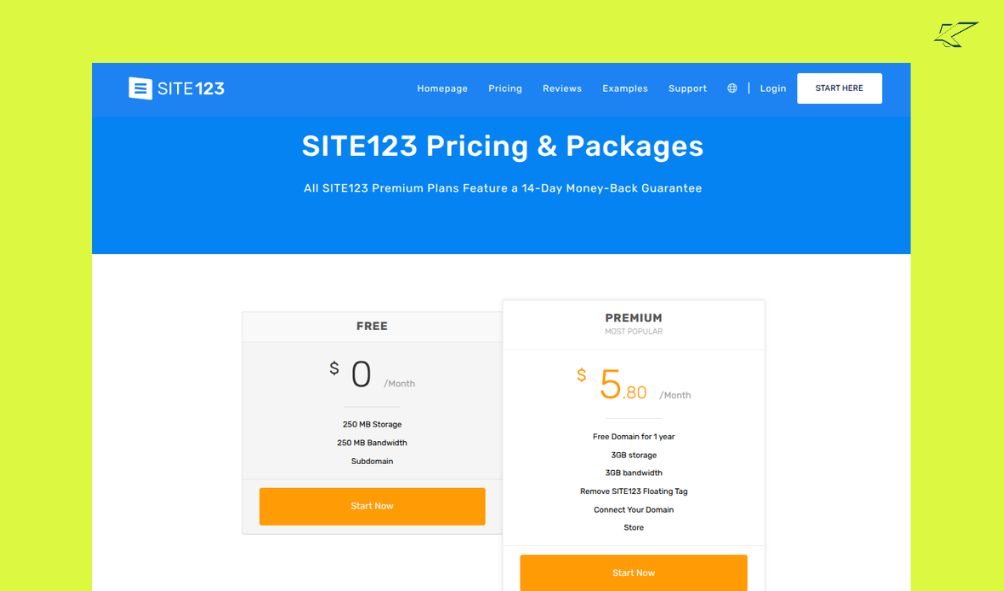
Free Plan — What You Get Without Paying
You get full access to the site123 free website builder. That means you can build, customize, and publish a site without paying a cent.
- Hosting, templates, responsive design, basic SEO settings, and sub-domain hosting (e.g. your-site.site123.me) are included.
- Good for: personal blogs, hobby sites, quick tests, school projects, or a simple portfolio. It’s a “starter home” — cheap, simple, and fast.
Paid Plans — What “Connect Domain” Means
If you want to use your own domain name (like yourname.com), remove SITE123 branding, and give your site a more professional look, you’ll want a paid plan. Connecting your custom domain is the main reason.
What you get when you upgrade:
- Custom domain connection (your own URL instead of a site123 sub-domain).
- Removal of SITE123 ads or branding.
- Often more freedom with storage, features, and site credibility.
| Use Case / Goal | Recommended Plan |
| Testing ideas, learning website building, temporary pages, personal hobby or portfolio | Free Plan — enough to launch quickly and for free |
| Building a personal brand, portfolio for clients, or a semi-professional site | Free plan now; upgrade later when you’re ready for a custom domain and branding |
| Running a small business, freelance service, or anything where credibility and trust matter | Paid Plan with Custom Domain — for professionalism, easy sharing, and better branding |
| Selling products or planning for long-term growth | Paid Plan + Domain — more stable, credible, and brandable for growth |
Pros and Cons of SITE123 (From Real Experience)
| Pros | Cons |
| Beginner-friendly: From the moment I clicked “Site123 log in,” I felt welcomed rather than overwhelmed | Limited customization: Can’t rebuild layouts from scratch |
| Fast setup: A working page live in about 12 minutes | Not ideal for large websites: restrictive for complex or high-traffic sites |
| Affordable compared to competitors: Free plan includes hosting, responsive design, templates, and basic SEO | Template designs can look generic: Many sites look similar |
| Good support: Guides and help resources are easy to follow |
Is SITE123 a Good Website Builder? (My Honest Verdict)
If you ask me plainly — yes — site123.com is a good website builder, but only for certain people and purposes. It hits the sweet spot when simplicity, speed, and low cost matter more than deep customization or big-scale growth.
Who Should Use SITE123
- Beginners & Non‑Tech Folks — If you’ve never built a website before and don’t want to wrestle with code, SITE123 delivers a smooth, stress‑free way to get online.
- Side‑Projects, Portfolios, Simple Sites — For a small blog, personal site, a resume/portfolio for clients, or a casual project — it’s fast, free (or cheap), and gets the job done.
- Small Businesses / Freelancers / Micro‑Shops — If you need a simple online presence or a small e‑commerce store without much overhead, the ease of setup and low cost are genuine advantages.
- People Wanting Speed & Convenience Over Perfection — If you care more about launching quickly than crafting a pixel‑perfect custom design, SITE123 fits well.
Who Should Avoid—or Think Twice About—SITE123
- Large Businesses or Growing Websites — If you expect heavy traffic, lots of pages, advanced features, or scaling, SITE123 will likely feel restrictive.
- Users Who Value Deep Customization or Unique Design — Because templates are shared and customization is limited, your site may end up looking like many others.
- Long‑term Brand Builders or High‑Traffic Stores — For advanced stores, complex SEO, performance scaling, or brand-heavy projects, more flexible platforms are better.
- Developers / Power Users That Need Extensions or Custom Code — If you need plugins, custom scripts, or complex backend logic — SITE123’s simplicity becomes a limitation.
Quick Comparison: SITE123 vs. Wix, WordPress.com & Squarespace
| Platform | Strength for Users Who Want | When SITE123 is Better | When Others Are Better |
| SITE123 | Fast setup, simple interface, free/cheap | You’re a beginner; need a quick site or small store | You don’t need deep customization or heavy scaling |
| Wix | Drag‑and‑drop flexibility, many apps, more design control | If SITE123’s simplicity feels too limiting | You want more creative control, custom design, moderate growth |
| WordPress.com | Long-term scalability, plugins, content control | When you don’t need hosting/maintenance hassle yet prefer growth potential | You plan to grow, need SEO tools, lots of content or custom features |
| Squarespace | Modern designs, polished templates, good for creatives/businesses | Only if you care about design polish and have a budget | If you want free plan simplicity — SITE123 still wins for cost |
- SITE123 wins on simplicity, speed, and cost — ideal for quick small sites.
- Wix or Squarespace work better if you want more design control and middle‑level flexibility.
- WordPress.com (or self‑hosted WordPress) becomes the better choice if you expect growth, need custom features, or want long-term control and scalability.
My Final Word
If I were you and I needed a website today — for a portfolio, personal blog, small business, or a quick online shop — I’d go with SITE123. It’s like using a quality pre‑made template that works right out of the box: simple, tidy, and fast.
But if I planned long-term growth, serious branding, or deep customization — I’d look at Wix, WordPress, or Squarespace instead. SITE123 isn’t a one‑size‑fits‑all champion, but for the right use‑case, it’s a solid, honest choice.
Alternatives to SITE123 (And When They’re Better)
If you find SITE123 a bit too simple or limited, several other website builders shine — depending on what you value more. Here’s a look at four popular alternatives and when each might beat SITE123 for your project.
Wix — Best for More Design Freedom
- Wix gives you a drag‑and‑drop interface, letting you move elements around freely — kind of like arranging furniture exactly where you want.
- If you care about unique layout, custom visual design, or creative presentation (not the same “template look”), Wix is better than SITE123’s more structured style.
- For small‑to‑medium sites that need eye‑catching designs — portfolios, creative businesses, small shops — Wix blends ease and flexibility well.
WordPress.com — Best for Long-Term Growth & Content/Blog-Centric Sites
- WordPress.com (and its self‑hosted sibling) is built for content: blogs, dynamic content, frequent updates, and scaling over time.
- If you see your site growing — more pages, multiple authors, lots of content — WordPress gives you control, flexibility, and a robust ecosystem (themes, plugins, SEO tools).
- For serious blogs, content‑rich sites, or brands that plan to expand, WordPress handles the long haul better than SITE123’s simple setup.
Webflow — Best for Maximum Customization & Professional-Level Design
- Webflow is for people who want full control — custom layout, advanced interactions, precise styling, and sometimes complex site structure.
- If you know (or are willing to learn) more about design and want a site that doesn’t look like a “template,” Webflow is far more powerful than SITE123.
- Great for designers, agencies, or anyone needing a polished, unique site and ready to invest time in building it.
Weebly — Another Beginner‑Friendly Alternative with a Good Balance
- Weebly is similar in spirit to SITE123: designed for ease and simplicity, but offers slightly more flexibility.
- For users who find SITE123 too basic but don’t need full-blown complexity, Weebly is a middle‑ground choice — easier than Webflow, more flexible than SITE123.
- It’s a good pick for small businesses, simple online stores, blogs, or portfolios that need a bit more control than the simplest builders.
When Each Alternative Makes Sense (vs SITE123)
| Your Need / Goal | Best Option |
| Want easy start + full control on design | Wix or Weebly |
| Planning to grow big — many pages or lots of content | WordPress.com |
| Need unique design, complex layouts, custom UX | Webflow |
| Want simple site, minimal maintenance, no coding, quick launch |
SITE123 Review Based on Use‑Cases
For Small Businesses
If you’re a small business owner in the U.S. — think a local shop, a freelance service, or a micro‑enterprise — SITE123 is a solid fit. The ease of setup and low cost make it ideal if you just need a simple site: maybe a home page, about page, contact info, and a basic shop or service listing. Because hosting, templates, and a site editor come together, you don’t need to worry about tech or pay extra for infrastructure. For a modest business that isn’t expecting heavy traffic yet, SITE123 gives enough professionalism without the overhead.
That said: if you plan to scale — add lots of pages, want advanced shopping features, or expect many users — the limitations in customization may bite. For a small, local‑scale business though, it’s often “good enough.”
For Students & Freelancers
As a student, freelancer, or side‑hustler, you often want to launch fast, with minimal cost and effort. SITE123 shines in that scenario. You can use it for a simple portfolio, a personal branding page, or a freelance service landing page — all without budget or deep technical knowledge. The free website builder plan is especially useful for people in school or early career stages.
Because the interface is intuitive and you can get something live in minutes, it becomes less about web‑design skill and more about your content or offer. For a student or freelancer juggling studies, jobs, or multiple gigs, that ease — and the ability to update content anytime — is a major plus.
For Beginners Building Their First Website
If this is your first time trying to build a website ever, SITE123 is probably one of the easiest places to start. You don’t need coding or design background. You don’t need to wrestle with hosting, plugins, or server settings. The guided workflow and template‑first approach let you focus simply on content.
It’s a launchpad: you learn the basics of website structure, publishing, and maintenance — without becoming overwhelmed. And once you get comfortable, you can always consider upgrading to a more flexible platform later.
For Simple Blogs or Portfolios
For pure content — a personal blog, a collection of writing, a photography portfolio, a resume site — SITE123 is more than capable. The built‑in SEO tools, mobile‑friendly templates, and clean layouts make your content accessible and readable. For readers or clients in the U.S., that matters.
If you’re not expecting heavy traffic or complicated functionality (comments, custom plugins, complex media galleries), SITE123 covers the essentials. It’s quick, affordable (even free), and removes much of the friction of launching.
My Use‑Case Advice: When SITE123 Fits — and When It Doesn’t
- Use SITE123 if you value speed, low cost, and simplicity: like launching a portfolio, a small business page, or a side‑hustle site quickly.
- Avoid SITE123 if your ambitions include scaling, heavy traffic, complex features, deep customization, or long‑term growth.
FAQs:
Q1: What is SITE123 and how does it work?
A1: SITE123 is a beginner-friendly website builder that lets you create sites fast using templates, mobile-ready design, and simple editing tools.
Q2: Is SITE123 free to use?
A2: Yes, SITE123 offers a free plan with hosting, templates, and basic SEO tools, perfect for portfolios, hobby sites, and small projects.
Q3: Who should use SITE123?
A3: Beginners, students, freelancers, and small business owners benefit most from SITE123 for quick, low-cost, stress-free website building.
Q4: Can I connect my own domain on SITE123?
A4: You can connect a custom domain with a paid SITE123 plan, remove branding, and make your site look more professional.
Q5: How does SITE123 compare to Wix or WordPress?
A5: SITE123 is simpler and faster, Wix gives more design freedom, and WordPress is better for long-term growth and content-rich sites.
Q6: Is SITE123 good for e-commerce?
A6: SITE123 works for small online stores with simple product listings and basic payment options but is not ideal for large-scale shops.
Q7: Are SITE123 websites mobile-friendly?
A7: Yes, SITE123 templates adjust automatically for all screen sizes, keeping layouts clean and readable on phones and tablets.
Q8: How fast can I build a website with SITE123?
A8: Beginners can get a working SITE123 site live in under 15 minutes using ready-made templates and guided setup.
Q9: What are the limitations of SITE123?
A9: SITE123 offers limited customization, some generic templates, and may not suit large websites or high-traffic projects.
Q10: Does SITE123 help with SEO?
A10: SITE123 includes basic SEO tools like meta titles, descriptions, URLs, alt text, and sitemap generation for beginner-friendly Google optimization.
Final Thoughts — My Personal Recommendation for 2026
After spending real time with SITE123, here’s my honest takeaway: it’s not perfect, but it’s genuinely useful for the right people. For anyone who wants a fast, beginner-friendly website without headaches, it delivers exactly that. The free website builder is surprisingly capable, and the paid plans add credibility and flexibility without breaking the bank.
When I’d personally use SITE123, I’d pick it if I needed a quick portfolio, a small business landing page, a personal blog, or a simple online store. Basically, projects where speed, simplicity, and low cost matter more than deep customization. It’s my go-to when I want something live in minutes, not weeks.
When I wouldn’t use SITE123: I’d avoid it if I needed a large, highly customized site, complex e-commerce setup, or advanced SEO and marketing features. For anything requiring intricate design control or scaling, platforms like WordPress.com, Webflow, or Squarespace are better suited.
In short, SITE123 is like a reliable starter car — perfect for city driving, easy parking, and low maintenance. But if you’re planning a cross-country road trip with lots of passengers and cargo, you’ll need a bigger vehicle. For most small projects, though, SITE123 hits the sweet spot between simplicity, affordability, and performance.

Hi, I am the founder of KlickTrust. I’m a digital strategist and builder with a deep passion for creating systems that help people build faster online. I started KlickTrust to save creators, freelancers, and entrepreneurs from wasting months starting from scratch by giving them access to practical, ready-to-use digital tools, templates, and automation systems that actually work in the real world.
At KlickTrust, I focus on speed, trust, and empowerment, so you can launch, grow, and scale with confidence.

