
I’ve worked with many business owners who overlooked Pinterest. “That’s just for recipes and home decorating,” they’d say. Then they discovered that Pinterest users spend twice as much time shopping monthly compared to non-Pinners. The platform has 537 million monthly active users actively searching for inspiration and products. Through consulting with successful entrepreneurs and marketing professionals, I’ve learned that using Pinterest for business is one of the most underutilized marketing channels available. Let me walk you through exactly how to use Pinterest for business so you can tap into a platform that drives high-intent customers to your brand.
Why Pinterest Is Different From Other Social Platforms
Before diving into strategy, understand what makes Pinterest marketing unique. Most people misunderstand the platform.
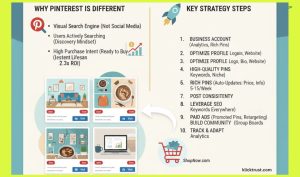
Pinterest isn’t a social network like Facebook. It’s a visual search engine. People don’t go there to see what friends are doing. They go there to discover new ideas, find inspiration, and plan purchases. That changes everything about how you should market.
Here’s the key difference. On Facebook, Instagram, and TikTok, people passively consume content. Brands interrupt their scrolling. On Pinterest, people actively search for content they want to find. They’re in a discovery mindset. They’re ready to be inspired and take action.
This creates massive opportunity for businesses. Instead of interrupting people, you’re answering their searches. Instead of fighting for attention, you’re providing exactly what they’re looking for.
Step 1: Create Your Pinterest Business Account
You need a business account, not a personal account. Business accounts unlock critical tools.
Go to pinterest.com. If you don’t have a Pinterest account, sign up. If you have a personal account, convert it to a business account (you can do this in settings).
A business account gives you:
- Pinterest Analytics to track performance
- Rich Pins with enhanced information
- Promoted Pins for paid advertising
- Tag options for better discoverability
- Shop tab to sell directly on Pinterest
Don’t skip this step. Personal accounts don’t have these marketing tools.
Step 2: Optimize Your Profile
Your profile is your storefront. Make it count.
Profile Picture
Upload a high-resolution image of your company logo (165 x 165 pixels). Make it clear and recognizable. This appears next to every Pin you create.
Cover Image
Add a cover image that represents your brand. Use seasonal imagery, product photos, office shots, or branded graphics. This is the first thing visitors see. Make it visually appealing and on-brand.
Bio
Write a compelling bio (160 characters max) that clearly describes what your business does. Include relevant keywords. Example: “Home decor inspiration for modern living spaces. Shop our curated collection.”
Make your profile searchable. Go to Privacy Settings and ensure you’re visible in search results. This dramatically increases discoverability.
Website Link
Add your website URL to your profile. Include links to your other social media profiles. Make it easy for people to visit your business and learn more.
Step 3: Create Strategic Boards
Boards organize your Pins into themes. Think of them as collections.
Plan Your Board Structure
Create 3-5 boards initially. Organize them by theme or product line. A coffee shop business might have boards for “Coffee Inspiration,” “Pastry Ideas,” and “Café Ambiance.” A home decor brand might have “Nordic Style,” “Modern Living,” and “DIY Projects.”
Each board should have a clear theme. This helps both users and Pinterest’s algorithm understand what you’re about.
Use Keywords in Board Names
Board names appear in search results. Use relevant keywords. Instead of “Random Stuff,” use “Home Office Organization Tips.” Include keywords people actually search for.
Mix Your Content With Curated Content
Don’t pin only your own content. Repin content from other creators that’s relevant to your niche. A mix of your content and relevant third-party content makes your boards more valuable and shows you’re curating a resource, not just promoting yourself.
Step 4: Create High-Quality Pins
Pins are the core of Pinterest. Your success depends on Pin quality.
Visual Requirements
Pinterest favors vertical Pins (1000 x 1500 pixels). Vertical Pins take up more space in feeds, getting more attention. Make them visually stunning. High-quality images outperform low-quality ones consistently.
Use clear, readable fonts. Bold colors. High contrast. Make Pins thumb-stoppingly beautiful. People scroll fast. Your Pin has maybe 0.5 seconds to grab attention.
Write Compelling Pin Titles and Descriptions
Include keywords in your title. Describe what the Pin is about clearly. Use 100-200 characters for the description. Be specific. Instead of “Good recipe,” use “5-Minute Chocolate Chip Cookie Recipe for Busy Mornings.”
Keywords matter. Pinterest’s algorithm searches for keyword matches. Use keywords people actually search for.
Include a Call-to-Action
Tell people what to do. “Save this idea,” “Shop this collection,” “Try this recipe,” “Read the full guide.” Clear calls-to-action increase engagement and click-through rates.
Link to Your Website
Every Pin should link somewhere. To a product page, blog post, landing page, or product catalog. Pins without links are missed opportunities.
Step 5: Use Rich Pins for Extra Power
Rich Pins automatically pull information from your website and display it directly on your Pin. They’re incredibly effective.
Product Pins
Show real-time prices, availability, and reviews. Customers can see if products are in stock and how much they cost directly on the Pin.
Recipe Pins
Display ingredients, cook time, and nutrition information. Makes the Pin far more useful than a standard image.
Article Pins
Show your headline, description, and featured image. Readers see the full context before clicking.
How to Set Up Rich Pins
Install the Pinterest Tag on your website. This lets Pinterest read information from your pages. Then, validate your website in Pinterest. After validation, Pins from your site automatically become Rich Pins.
Step 6: Post Consistently and Strategically
Success requires consistency. But not all posts are equal.
Posting Schedule
Post regularly. 5-15 Pins per week is a good target. More is fine. Quality matters more than quantity, but consistency signals to the algorithm that you’re active.
Optimal Posting Times
Peak Pinterest usage is mornings (8-11am) and evenings (8-10pm). Post during these times for maximum visibility. Different audiences have different peak times. Test and monitor what works for your audience.
Repurpose Content
Create multiple Pins from one piece of content. A blog post can become 5-10 different Pins with different titles, descriptions, and designs. Spread them out over weeks. This extends content lifespan and tests what resonates.
Use Pin Scheduling
Platforms like Tailwind and Metricool let you schedule Pins in advance. This saves time and ensures consistent posting without daily effort.
Step 7: Leverage Pinterest SEO
Pinterest is a search engine. Optimize for it.
Research Keywords
Use Pinterest’s search bar. Type your topic. See what autocomplete suggests. These are actual searches people do. Use these keywords in your Pins and boards.
Tools like Tailwind Analytics and Canva also show trending keywords for your niche.
Optimize Everything
Include keywords in:
- Board names
- Pin titles
- Pin descriptions
- Your profile bio
But use them naturally. Don’t stuff keywords. Write for humans first, search engines second.
Monitor Trending Topics
Pinterest publishes trend reports. Check Pinterest Predicts annually. See what trends will dominate 2025 in your industry. Create Pins around these trends before they peak.
Step 8: Build Community and Engagement
Success comes from genuine engagement, not just broadcasting.
Join Group Boards
Group boards let multiple creators share Pins under one board. Find relevant group boards in your niche. Join and contribute. This exposes your content to new audiences.
Respond to Comments
When people comment on your Pins, respond. Engagement signals boost your Pin visibility. Build real relationships.
Repin Relevant Content
Repinning other creators’ content builds goodwill and positions you as a curator and thought leader.
Follow Relevant Accounts
Follow other creators, competitors, and brands in your niche. Engage with their content. Community building drives awareness.
Step 9: Invest in Paid Advertising
Organic reach is valuable. Paid advertising accelerates growth.
Promoted Pins
Boost your best-performing Pins with paid promotion. Pinterest ads are cost-effective. Brands see 2.3x more efficient cost per conversion on Pinterest compared to other social platforms.
Start with a small budget ($5-10/day). Promote Pins that already perform well organically. Scale up what works.
Retargeting Ads
Show your ads to people who’ve visited your website but didn’t buy. Retargeting keeps your brand top-of-mind as they browse Pinterest.
Pinterest Shop
If you sell products, set up Pinterest Shop. Customers can browse and purchase directly on Pinterest. Rich Product Pins show real-time prices and availability. This removes friction from the buying process.
Connecting Pinterest to Your Larger Business Strategy
Pinterest marketing is most powerful when integrated with your other business efforts.
If you own a coffee shop business, Pinterest drives foot traffic. We have a guide on how to start a coffee shop business that emphasizes building community. Pinterest lets you share coffee inspiration, pastry ideas, and café ambiance to attract your ideal customers.
If you run a home staging business, Pinterest is perfect for showcasing before-and-after transformations. We have a guide on how to start a home staging business. Your staging work is visually beautiful and inspires people planning renovations.
If you operate a virtual assistant business, Pinterest helps you establish authority. We have a guide on how to start a virtual assistant business. Create Pins about productivity tips, business organization, and time management. Position yourself as an expert.
For any business, ensure your Google Business Profile is complete and accurate. We have a guide on how to access your Google Business Profile that covers optimization. Direct Pinterest traffic to consistent business information across platforms.
When you drive traffic from Pinterest to your website, you’ll want to understand which expenses are deductible. We have a guide on how business tax write-offs work that covers marketing expenses. Pinterest advertising costs are fully deductible business expenses. Track this carefully.
Measuring Success on Pinterest
Data drives decisions. Track what matters.
Key Metrics
Impressions: How many times your Pins were displayed. Higher impressions mean more visibility.
Outbound Clicks: How many people clicked through to your website. This drives traffic.
Saves: How many people saved your Pin to their board. This indicates the Pin resonated.
Engagement Rate: Saves divided by impressions. Shows how relevant your content is.
Conversion Tracking: How many people converted (purchased, signed up) from Pinterest traffic.
Using Analytics
Check Pinterest Analytics monthly. See which Pins drive the most traffic. See which audience demographics engage most. Double down on what works. Adjust what doesn’t.
Common Mistakes on Pinterest
Learn from others’ failures.
Too Much Self-Promotion
Sharing only your own content. Pinterest penalizes this. Share curated content. Help people. Promote when it adds value.
Low-Quality Pins
Fuzzy images. Unreadable text. Boring designs. These don’t get saved or shared. Invest in quality visuals.
No Clear Call-to-Action
Pins without calls-to-action underperform. Tell people what to do. “Save this,” “Click to learn,” “Shop now.”
Ignoring Keywords
Using generic descriptions instead of keyword-rich descriptions. You’re invisible if you don’t optimize for search.
Inconsistent Posting
Going months without activity then dumping lots of content. Pinterest rewards consistency. Post regularly.
The Bottom Line
Pinterest is a powerful, underutilized marketing channel. 537 million monthly users. High purchase intent. Long content lifespan. Cost-effective advertising.
Whether you’re selling products, driving traffic to content, or building brand awareness, Pinterest works.
Start today. Create your business account. Optimize your profile. Create beautiful Pins. Post consistently. Engage with community. Track results. Scale what works.
Your Pinterest presence is waiting. Your audience is already on the platform searching for what you offer. Give them a reason to find you.
FAQs:
Q: Is Pinterest worth using for B2B businesses?
A: Pinterest works best for visual industries (fashion, home, food, crafts). B2B companies can succeed with educational content and inspiration. Focus on problems you solve and how you solve them.
Q: How long does it take to see results on Pinterest?
A: Organic results take 2-3 months to build momentum. Paid advertising shows results faster. Pins continue driving traffic for months or years after posting.
Q: Can I sell products directly on Pinterest?
A: Yes. Use Pinterest Shop and Product Pins. Customers can purchase without leaving Pinterest. Rich Product Pins with real-time pricing and inventory work exceptionally well.
Q: What’s the difference between a Pin and a Repin?
A: A Pin is original content you create. A Repin is when you save someone else’s Pin to your board. Both are valuable. Both help with visibility.
Q: How do I know what to Pin?
A: Research your target audience. What problems do they have? What inspiration do they seek? Create Pins that answer these questions. Use trending content for ideas.
Q: Should I Pin every day?
A: Aim for 5-15 Pins per week. Quality matters more than quantity. Consistency is more important than volume. Schedule them strategically rather than posting randomly.

Hi, I am the founder of KlickTrust. I’m a digital strategist and builder with a deep passion for creating systems that help people build faster online. I started KlickTrust to save creators, freelancers, and entrepreneurs from wasting months starting from scratch by giving them access to practical, ready-to-use digital tools, templates, and automation systems that actually work in the real world.
At KlickTrust, I focus on speed, trust, and empowerment, so you can launch, grow, and scale with confidence.

