

I still cringe at how many security tools flood my inbox with alerts that don’t matter. That’s exactly why I sat down to write this aikido review—to figure out if Aikido’s promise of one unified dev security platform with less noise and more real fixes actually works in real code and cloud environments.
In 2026, developers and security teams are expected to secure everything from code to IaC to runtime without juggling a dozen tools, and that’s the challenge Aikido aims to solve with SAST, SCA, secrets, and cloud posture scans in one place.
I’ve used many SAST, SCA, and IaC vulnerability scan tools in real projects, so I tested Aikido myself to see if it truly cuts false positives, speeds up triage, and fits modern dev workflows. What follows is a grounded look at what worked, what felt early, and how this compares to other options out there—no hype, just honest impressions you can trust.
What Is Aikido? (Platform Overview)
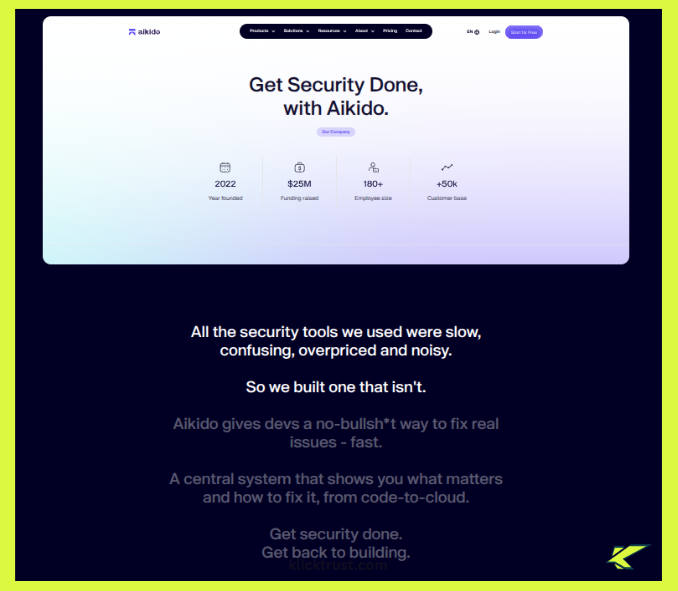
At its core, Aikido is a developer security platform that pulls many security checks into one clean dashboard. Instead of juggling separate tools for SAST, SCA, secrets, and IaC vulnerability scans, Aikido tries to keep everything under one roof. Think of it like a calm control room, not a blinking alarm panel. That focus alone is what makes this Aikido platform review worth attention.
Aikido is clearly built for modern teams—startups, SaaS companies, and fast-moving dev teams that ship code often. If your developers live in GitHub and hate security tools slowing them down, Aikido feels familiar and light. It doesn’t act like a strict auditor; it behaves more like a helpful teammate who points out real risks at the right time.
The main problem Aikido claims to solve is noise. Traditional AppSec tools often dump hundreds of issues on you and walk away, but Aikido puts serious effort into prioritization and context. Compared to legacy AppSec platforms, it feels less about fear and more about focus—secure what matters, fix it fast, and move on with your day.
Aikido Security Features – Deep Dive
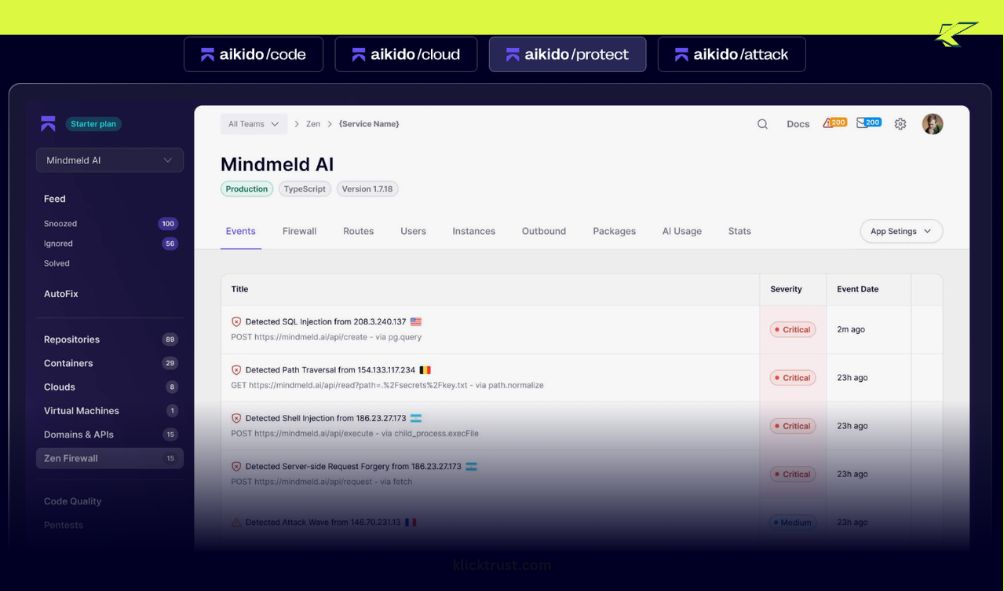
This is where an Aikido security review really gets interesting. Features look great on landing pages, but they only matter when they run on real repos, real pipelines, and real deadlines. I used Aikido the same way I’d use any daily tool—plugged into GitHub, watching what it flags, and judging how often it helps versus interrupts.
Overall, Aikido’s approach feels calm and intentional. Instead of screaming about every possible issue, it tries to explain why something matters right now. That design choice shows up clearly across its SAST, SCA, IaC, and runtime features.

SAST & SCA Scanning (In Real Projects)
Aikido’s static code analysis feels refreshingly lightweight. The scans kick off fast after connecting a repo, and results show up without long waits or confusing setup. Compared to heavier tools, it feels more like a quick health check than a full security audit—and that’s not a bad thing for day-to-day work.
For open-source dependency scanning, Aikido does what most teams actually need. It flags vulnerable packages, shows impact clearly, and avoids dumping low-risk issues in your lap. In this SAST SCA scanning review, speed stood out most—scans finished faster than many tools I’ve used, especially on medium-sized projects.
The real win is focus. Instead of dozens of alerts, you get a short list you can act on. That alone reduces friction between dev and security teams. It reminds me of the simplicity of Moosend Email Marketing setup—straightforward and easy to integrate.
IaC Vulnerability Scanning
IaC vulnerability scan support is one of Aikido’s quieter strengths. It checks Terraform and cloud configs for common missteps, like overly open permissions or risky defaults. The feedback is clear, even if you’re not a cloud security expert.
Where Aikido shines is in clarity. It explains why a misconfiguration is risky, not just that it exists. That makes fixes faster and avoids back-and-forth between teams.
That said, this area still feels early. It covers the basics well, but very complex cloud setups may want deeper controls. For most startups and SaaS teams, though, it hits the sweet spot. It feels a bit like using Bloom CRM for team management—simple, focused, and effective without extra noise.
Runtime Protection & Monitoring

Runtime means watching what happens after code ships, and this is where expectations matter. In this Aikido runtime protection review, the focus is on visibility, not heavy blocking. It highlights risky behavior and exposed paths rather than acting like a full firewall.
This helps most when teams want awareness without breaking production. You can spot issues tied to real usage, not just theory. That context makes fixing problems easier and more urgent.
The limitation is depth. If you expect advanced runtime enforcement, Aikido isn’t there yet. But as part of a balanced developer security platform, it adds real value without adding stress. Think of it as using Fox Signals—insightful without overwhelming you.
Bottom line: Aikido’s code review features feel designed for humans, not checklists. It trades exhaustive coverage for speed, clarity, and trust—and for many modern teams, that’s exactly the right deal.
False Positives – Does Aikido Really Reduce Noise?
False positives are the reason many developers quietly stop trusting security tools. I’ve seen scanners flag hundreds of “critical” issues that turned out to be dead code, test files, or edge cases no one could reach. After a while, alerts feel like background noise, not signals—and that’s a dangerous place to be.
This is where the false positives reduction Aikido promises caught my attention. Instead of dumping every possible issue on the dashboard, Aikido tries to rank problems by real risk and real context. It looks at how the code is used, not just how it looks on paper, which already puts it ahead of many traditional tools.
Here’s a real example. In one repo, Aikido flagged a vulnerable dependency that was actually used in production code, while ignoring a similar issue buried in a dev-only package. Other tools I’ve used flagged both with the same urgency. That small difference saved time and kept the team focused.
Compared to my experience in an Aikido vs Snyk review, the alert volume felt noticeably lower with Aikido. Snyk is powerful, but it often surfaces more findings, which means more triage work. Aikido’s list was shorter, calmer, and easier to act on without second-guessing every alert. This approach reminded me of how Moosend Email Marketing filters out unnecessary notifications—focused and actionable.
So, is this just marketing? From what I’ve seen, no. Aikido security false positives are genuinely fewer, not just hidden. It won’t catch everything, but it catches what matters—and in daily development, that trade-off feels smart rather than risky.
AI Code Autofix – Helpful or Risky?

AI fixes sound magical, but I went into this part of the AI code autofix Aikido feature with healthy doubt. In simple terms, Aikido looks at a flagged issue and suggests a safe code change you can apply or tweak. It doesn’t secretly rewrite your repo; it gives you a clear suggestion and lets you stay in control.
Where it really saved time was with common issues. Think unsafe configs, risky patterns, or dependency-related fixes that follow known best practices. In those moments, the autofix felt like a calm senior dev tapping your shoulder and saying, “Hey, do it this way.” That alone shaved hours off review cycles.
But no AI is perfect, and this one isn’t meant to be. For logic-heavy code or business-critical paths, I still reviewed everything by hand. The AI gets you 70–80% there fast, but the last mile still needs a human brain—and that’s a good thing.
My advice is simple. If you’re a junior developer, treat Aikido’s autofix as a learning tool and read every suggestion carefully. If you’re senior, use it as a speed boost, not a crutch. Used this way, AI code autofix in Aikido feels helpful, not risky—and that balance matters more than flashy automation.
Aikido vs Snyk – Honest Comparison
If you search for an Aikido vs Snyk review, you’ll usually find feature lists and marketing charts. What you won’t find often is how these tools feel in daily work. I’ve used both, and the difference is a bit like driving a quiet electric car versus a powerful truck—both get you there, but the experience is very different.
Here’s a simple, real-world breakdown based on actual use, not sales pages:
| Feature | Aikido | Snyk |
| False positives | Low noise, strong prioritization | More findings, more triage |
| Ease of setup | Very fast, minimal config | Easy, but more knobs to tune |
| Pricing | Predictable, startup-friendly | Can get expensive at scale |
| Enterprise readiness | Growing, not full-heavy yet | Very strong, enterprise-first |
| Developer experience | Calm, clean, dev-first | Powerful, but busier UI |
Let’s talk noise first, because that’s where I felt the biggest difference. Aikido focuses hard on false positives reduction, and it shows. Alerts feel curated, like someone already did the first round of thinking for you. With Snyk, I often saw more issues—useful, yes, but they demand time and judgment to sort through.
Setup is another clear split. Aikido feels like plug-and-play. Connect GitHub, wait a bit, and you’re moving. Snyk is still easy, but it asks more questions up front, which makes sense for larger teams that want tighter control.
Pricing is where many teams pause. Aikido feels built for startups and growing SaaS teams that need value without stress. Snyk delivers deep coverage, but as teams scale, costs can rise fast. That doesn’t make it bad—it just makes it a serious investment. For fast-moving teams, it’s almost like comparing the lightweight simplicity of Fox Signals to a more complex enterprise solution—both work, but the experience is different.
So who should choose what? Pick Aikido if your team moves fast, hates alert fatigue, and wants security to feel supportive, not heavy. Pick Snyk if you’re enterprise-grade, compliance-driven, and need maximum depth across many environments.
The cost vs value trade-off is simple. Aikido gives you speed, clarity, and focus. Snyk gives you power, depth, and control. If you’re searching for the best Aikido alternative Snyk, the real answer is this: choose the tool that matches how your team actually works, not how security should work on paper.
Aikido Security Pricing – Is It Worth It?

Pricing is usually where good security tools either earn trust or lose it fast. In this Aikido security pricing review, what stood out to me wasn’t a flashy discount or confusing tiers—it was how calm and predictable the model feels. Aikido presents itself like a modern developer security platform, not like a legal contract you need a lawyer to decode.
At a high level, you’re paying for coverage across multiple security areas in one place. That includes SAST, SCA, secrets scanning, IaC vulnerability scan support, and growing runtime visibility. Instead of stacking separate tools and licenses, Aikido bundles things in a way that feels intentional. You’re not paying five times for the same repo to be scanned five different ways.
What you actually pay for is time saved. Fewer false positives mean fewer hours wasted arguing with alerts. Faster setup means less onboarding pain. In real teams, time savings often matter more than small price differences on paper, especially when developers are expensive and deadlines are tight.
Hidden costs are where many tools sneak up on you, so I paid close attention here. With Aikido, scaling feels smoother than with some enterprise-first platforms. You don’t suddenly hit a wall where every new repo or developer explodes the bill, which makes budgeting less stressful for growing teams.
For small startups, the ROI shows up fast. You get solid security coverage without hiring a dedicated AppSec engineer on day one. For growing SaaS teams, the value comes from consolidation—fewer tools, fewer dashboards, and fewer fires to put out. It’s not the cheapest option in the world, but it’s priced like a tool that respects your time.
So, is it worth it? If your team wants real security without financial surprises or alert fatigue, Aikido’s pricing feels fair and thoughtfully designed. You’re not just paying for scans—you’re paying for focus, and that’s harder to replace than any single feature.
If you want to explore the current deal for Aikido, you can check from here.
Aikido Security G2 Reviews – What Other Users Say
Before trusting any tool, I always check what real users say, and Aikido security G2 reviews tell a pretty clear story. Many reviewers praise how calm the platform feels. Words like clean, simple, and developer-friendly come up again and again. That lines up with my own experience of fewer alerts and faster understanding.
A common theme in positive reviews is noise reduction. Users often mention fewer false positives and better prioritization compared to older AppSec tools. Several reviews also highlight fast setup and smooth GitHub integration, which matches what I saw when I connected my first repo. The tool feels welcoming, not overwhelming.
Of course, no product gets perfect scores. Some G2 users point out limits in advanced enterprise features, especially around deep runtime controls and heavy customization. That didn’t surprise me. In my own use, Aikido felt strongest as a focused developer security platform, not a full replacement for complex enterprise stacks.
What matters most is alignment. My experience matches most Aikido security G2 reviews: great for fast-moving teams, lighter for highly regulated environments. I treat G2 reviews as a reality check, not gospel. When many users repeat the same praise and the same concerns, it’s usually a signal worth trusting—and here, that signal feels honest and consistent.
Pros and Cons of Aikido (Real-World Summary)
After spending weeks with Aikido in real projects, here’s how it shakes out in practice. I’ve tried to be brutally honest, because the last thing developers need is another tool hyped up like it can do everything.
Pros
Developer-first UX – Right away, Aikido feels built for humans, not auditors. The dashboard is clean, intuitive, and doesn’t overwhelm you with every minor issue. I actually enjoyed checking results instead of dreading them.
Reduced alert fatigue – This is the real win. Instead of drowning in dozens of warnings, Aikido filters out the noise and surfaces what truly matters. It’s like having a teammate who only flags the fires worth putting out, saving hours of triage work.
Fast onboarding – Connecting repos and pipelines took minutes, not hours. No complex setup, no hidden configs. Even my teammates who usually groan at security tools got up and running quickly.
Cons
Not yet a full enterprise replacement – While fantastic for startups and fast-moving dev teams, Aikido doesn’t cover every edge case that large, heavily regulated enterprises might require. Think of it as a powerful car for city streets—not quite ready for off-road corporate compliance terrains.
Limited deep customization – For teams wanting granular control over every scan, alert, and policy, Aikido can feel a little “by the book.” It’s intentionally opinionated, which is great for speed but restrictive if you want full flexibility.
Still maturing in runtime coverage – Runtime monitoring is present and helpful, but it’s not as comprehensive as specialized runtime protection tools. It’s enough to catch major issues, but for advanced security teams, it may require complementary solutions.
Bottom line: Aikido balances clarity and focus over exhaustive coverage. For most dev teams, that trade-off is a blessing, but if you’re running a highly complex environment, it’s important to know where it currently draws the line.
Who Should Use Aikido (and Who Shouldn’t)
If you’re part of a startup or a lean dev team, Aikido feels like it was made for you. The platform moves at the pace developers actually work, catching real risks without drowning you in alerts. For SaaS teams shipping code daily, its unified approach to SAST, SCA, secrets scanning, and IaC vulnerability scans means fewer dashboards, fewer interruptions, and more time to actually build features. From my experience, it’s like having a teammate who quietly keeps an eye on security while letting you focus on coding.
On the flip side, Aikido isn’t ideal for highly regulated enterprises or teams that need exhaustive runtime enforcement. If you’re operating in finance, healthcare, or any environment with extreme compliance requirements, the platform’s current runtime protection and policy customization might feel a bit light. Think of it as a high-performance city car—it’s fast, nimble, and efficient, but it won’t handle off-road corporate compliance terrain without extra support.
Finally, if you’re migrating from tools like Snyk or older AppSec platforms, Aikido can be a breath of fresh air. Its focus on false positives reduction, Aikido really shines here, letting teams adopt security without the usual flood of unnecessary alerts. You’ll still want to double-check critical paths and complex IaC configurations, but for most dev teams, it strikes a perfect balance between vigilance and calm.
Final Verdict – Is Aikido Worth Using in 2026?
After spending weeks testing Aikido in real dev workflows, here’s the honest truth: yes, it’s worth a serious look. This aikido review isn’t about hype—it’s about how the platform performs day-to-day. For teams that value speed, clarity, and reduced noise, Aikido delivers. Its focus on false positives reduction Aikido, fast SAST and SCA scanning, IaC vulnerability checks, and AI-assisted code autofix all combine to make security feel helpful rather than obstructive.
That said, it’s not a silver bullet. If you’re in a heavily regulated enterprise or need ultra-deep runtime enforcement, you might still need complementary tools. Aikido shines most when it’s part of a modern dev workflow: lightweight, integrated, and designed for humans, not just compliance checklists.
In my experience, the platform’s strongest points are its calm dashboard, actionable alerts, and developer-first approach. Compared to traditional AppSec tools—or even Snyk in some cases—Aikido reduces alert fatigue and keeps teams focused on the issues that actually matter.
So, should you use it? If your team is shipping fast, hates alert overload, and wants security that feels like a teammate instead of a nagging manager, Aikido is a strong choice. It’s not perfect, but in 2026, it’s one of the most balanced developer security platforms I’ve tested. And for most startups, SaaS companies, and modern dev teams, that balance is exactly what you need to keep code safe without losing your sanity.
FAQs
Q1: What is Aikido, and how does it help developers?
Aikido review shows it is a developer security platform that scans code, dependencies, and cloud configs to reduce risks and false positives.
Q2: How does Aikido compare to Snyk?
Aikido vs Snyk review highlights Aikido’s lower alert volume and faster scans, making it ideal for startups and fast-moving dev teams.
Q3: Does Aikido reduce false positives in security scans?
Yes, Aikido security review confirms its smart prioritization cuts noise, showing only high-risk issues for faster, focused fixes.
Q4: Can Aikido scan IaC and cloud configurations?
Aikido supports IaC vulnerability scan, including Terraform and cloud setups, helping teams catch misconfigurations before they reach production.
Q5: Does Aikido offer AI code autofix features?
Aikido AI code autofix suggests safe code changes for flagged issues, saving time while letting developers review critical paths.
Q6: Who should use Aikido for developer security?
Startups, SaaS teams, and lean dev teams benefit most, while highly regulated enterprises may need extra runtime and compliance tools.
Q7: Is Aikido worth the cost for small teams?
Aikido security pricing review shows it provides bundled coverage with predictable costs, reducing alert fatigue and saving developer time.
Q8: Are Aikido G2 reviews positive?
Aikido security G2 reviews praise its clean UX, fast setup, and reduced noise, matching real-world experiences for modern dev teams.

Hi, I am the founder of KlickTrust. I’m a digital strategist and builder with a deep passion for creating systems that help people build faster online. I started KlickTrust to save creators, freelancers, and entrepreneurs from wasting months starting from scratch by giving them access to practical, ready-to-use digital tools, templates, and automation systems that actually work in the real world.
At KlickTrust, I focus on speed, trust, and empowerment, so you can launch, grow, and scale with confidence.

