I’ve been there—staring at a messy to-do list, feeling like my brain has too many open tabs. Trying to find the right project management tool feels a lot like dating. You want something that “gets” you, doesn’t cost a fortune, and won’t ghost you when things get complicated. That’s why we’re diving deep into the Notion vs Trello vs Asana debate today. After years of juggling tasks, managing teams, and testing every app under the sun, I’m here to help you pick the one that won’t just add to the noise, but actually help you clear it. Let’s find your perfect match.
Quick Verdict
Choosing between these three is about matching your mental workflow to the right environment. Notion is the ultimate “digital architect” for those who want a unified hub for both documentation and task databases, though it requires a bit of setup. Trello is the “digital whiteboard,” ideal for visual thinkers who want to drag-and-drop their way through simple processes without any learning curve. Meanwhile, Asana is the “project commander,” built specifically for teams managing high-stakes deadlines and complex moving parts that require strict accountability. If you want total freedom, pick Notion; for instant visual clarity, pick Trello; and for professional-grade project tracking, go with Asana.
Overview of Notion
When I first opened Notion, it felt like walking into an empty room with a box of Legos. It was exciting but also a little daunting. Notion isn’t just a project management tool; it’s a workspace. It’s where your docs, wikis, and tasks all live together.
What is Notion?
Think of Notion as an “all-in-one” workspace. It replaces Google Docs, Evernote, and your task manager. You build your own workflow using “blocks”—text, images, checkboxes, or databases.
Key Features and Functionalities
- Wikis and Docs: You can write long pages of text, just like a Word doc, but embed tasks right inside them.
- Databases: This is the secret sauce. You can view the same data as a list, a calendar, a board, or a gallery.
- Templates: There are thousands of community-made templates for everything from habit tracking to product roadmaps.
Pros and Cons
Pros:
- It is incredibly flexible. You can make it look however you want.
- It consolidates multiple tools into one.
- The personal plan is very generous (basically free for individuals).
Cons:
- The learning curve is steep. You have to build your system.
- It can feel slow or “laggy” with too much data.
- Mobile app experience isn’t as snappy as others.
Ideal Use Cases
Notion is perfect for startups that need a company wiki, students organizing notes, or freelancers who want a custom dashboard for their life and work.
Overview of Trello
I remember using Trello back when it was just a simple whiteboard app. It felt like sticking Post-it notes on a wall, but digital. It’s simple, visual, and oddly satisfying to drag a card from “Doing” to “Done.”
What is Trello?
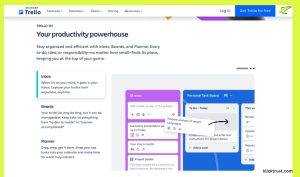
Trello is a Kanban-style tool. It organizes projects into Boards. Inside boards, you have Lists (columns), and inside lists, you have Cards (tasks). It’s all about visualizing the flow of work.
Key Features and Functionalities
- Kanban Boards: The core of Trello. See your workflow at a glance.
- Power-Ups: Add features like calendars, voting, or integrations with Slack and Google Drive.
- Butler Automation: Set up rules like “When a card is moved to Done, check off the due date.”
Pros and Cons
Pros:
- Zero learning curve. You can start using it in seconds.
- Very visual and intuitive.
- Great free plan for small teams.
Cons:
- It gets messy with large, complex projects.
- Limited views (mostly just boards) unless you pay up.
- Not great for storing long-form documentation.
Ideal Use Cases
Trello shines for simple linear workflows: content calendars, hiring pipelines, or small teams tracking weekly sprints.
Overview of Asana
Asana feels like the grown-up in the room. When I moved from a chaotic startup to a more structured agency, Asana was our lifeline. It’s built for getting serious work done without the fluff.

What is Asana?
Asana is a traditional work management platform. It’s designed to help teams organize, track, and manage their work. It focuses heavily on who is doing what and by when.
Key Features and Functionalities
- Multiple Views: Switch between List, Board, Timeline, and Calendar views instantly.
- Portfolios: Group related projects together to see high-level progress.
- Workload Management: See if your team is burned out or has capacity for more work.
Pros and Cons
Pros:
- Excellent for task dependency (Task B can’t start until Task A is done).
- Very structured and powerful for big teams.
- Fun “celebrations” (unicorns fly across the screen when you finish tasks).
Cons:
- The interface can feel cluttered with too many features.
- The best features (Timeline, Portfolios) are expensive.
- It can feel rigid if you just want to jot down quick notes.
Ideal Use Cases
Asana is the go-to for marketing teams, event planners, and mid-sized companies managing complex projects with strict deadlines.
Side-by-Side Comparison
Now, let’s put them in the ring together.
User Interface and Design
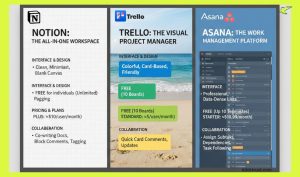
- Notion: Clean, minimalist, black and white. It looks like a blank sheet of paper. It’s beautiful but requires you to design the layout.
- Trello: Colorful and card-based. It’s friendly and approachable. You can change backgrounds to photos, making it feel personal.
- Asana: Professional and functional. It uses lots of colors for tags and statuses but focuses on lists and data density.
Pricing and Plans
- Notion: Free plan is amazing for individuals (unlimited pages). The Plus plan for teams starts at roughly $10/user/month (billed annually).
- Trello: Free plan includes unlimited cards but only 10 boards. The standard plan is about $5/user/month, and Premium is $10/user/month.
- Asana: Free plan covers up to 10 teammates, but is limited. The Starter plan begins at $10.99/user/month, and the Advanced jumps to $24.99. It’s the priciest of the bunch.
N.B. Make sure to pricing then check the details on their official websites.
Collaboration Capabilities
- Notion: Great for co-writing docs. You can comment on text blocks and tag people. It feels like Google Docs but better.
- Trello: Comments happen on the back of cards. It’s good for quick updates but bad for long discussions.
- Asana: Built for accountability. You can assign subtasks to different people, set dependencies, and follow tasks to get updates.
I’ve been there—staring at a messy to-do list, feeling like my brain has too many open tabs. Trying to find the right project management tool feels a lot like dating. You want something that “gets” you, doesn’t cost a fortune, and won’t ghost you when things get complicated. That’s why we’re diving deep into the Notion vs Trello vs Asana debate today. After years of juggling tasks, managing teams, and testing every app under the sun, I’m here to help you pick the one that won’t just add to the noise, but actually help you clear it. Let’s find your perfect match.
| Feature | Notion | Trello | Asana |
| Best For | Building a “Second Brain” | Simple, visual workflows | Complex team projects |
| Vibe | Minimalist & Blank Canvas | Friendly & Card-based | Structured & Professional |
| Learning Curve | High (Steep) | Very Low (Instant) | Medium |
| Key Strength | Docs + Tasks in one | Visual simplicity | Task dependencies |
| Starting Price | ~$10/user/month (Plus) | ~$5/user/month (Standard) | ~$10.99/user/month (Starter) |
Real-World Use Cases
Let me share how I’ve actually seen these used in the wild.
The Creative Freelancer (Notion):
My friend Sarah, a graphic designer, uses Notion. She has a page for each client. Inside, she has a mood board (images), a contract (text), and a checklist of deliverables (database). It’s her entire business OS.
The Editorial Team (Trello):
At a blog I wrote for, we used Trello. We had lists: “Ideas,” “Writing,” “Editing,” and “Published.” As I finished a draft, I dragged my card to “Editing.” The editor got a notification. Simple, fast, effective.
The Software Agency (Asana):
When managing a product launch, we used Asana. We had a timeline showing that the “Design” task had to finish before “Development” could start. If Design got delayed, Asana automatically shifted the Dev dates. It saved us from missing deadlines.
Which Tool is Right for You?
Use this guide to match your personality and project type.
Choose Notion if…
-
The Vision: You want a customizable “Second Brain” for your life and work.
-
The Needs: You need a single hub for detailed notes, wikis, and task databases.
-
The Person: You enjoy tinkering, building your own systems, and value ultimate flexibility.
Choose Trello if…
-
The Vision: You want a digital whiteboard that is as simple as a sticky note.
-
The Needs: You have a linear process (To-Do → Doing → Done) and need high visual clarity.
-
The Person: You are a visual thinker who wants to get started in seconds without a tutorial.
Choose Asana if…
-
The Vision: You are managing a professional team with high-stakes deadlines.
-
The Needs: You need to track complex dependencies (e.g., “Step B can’t start until Step A is done”).
-
The Person: You are willing to invest in a structured, powerful tool to ensure total accountability.
FAQs
Can I use Notion for project management?
Absolutely. While it started as a note-taking app, its database features make it a powerful PM tool. You just have to build the tracker yourself or use a template.
Is Trello free forever?
Yes, the free plan is free forever. However, if you need more than 10 boards or advanced automation, you will eventually hit a wall and need to upgrade.
Does Asana work for one person?
It can, but it might be overkill. The free Personal plan is fine for a solo user, but you might find Notion or Trello easier for personal tasks.
Can I migrate my data between them?
Yes. Most of these tools offer import features. You can import Trello boards into Notion or Asana easily. Moving from Notion to others is a bit tricker due to its unique formatting.
Final Verdict
Ultimately, the most effective tool is the one you will consistently use, not the one with the most features. It’s easy to get trapped in “productivity porn”—wasting hours perfecting your setup instead of actually completing tasks. I have seen million-dollar businesses thrive on simple Trello boards, while others struggle despite using expensive, high-tier Asana plans. If you crave absolute freedom and a unified space for notes and tasks, choose Notion. If you need instant visual clarity and a zero-learning-curve setup, go with Trello. However, if you are leading a team through complex projects with strict deadlines, Asana is your best bet. Commit to one for two weeks, stop overthinking the “perfect” system, and start clearing the noise. You’ve got this.
Pick one, stick with it for two weeks, and see if it helps you breathe a little easier. You’ve got this.

Hi, I am the founder of KlickTrust. I’m a digital strategist and builder with a deep passion for creating systems that help people build faster online. I started KlickTrust to save creators, freelancers, and entrepreneurs from wasting months starting from scratch by giving them access to practical, ready-to-use digital tools, templates, and automation systems that actually work in the real world.
At KlickTrust, I focus on speed, trust, and empowerment, so you can launch, grow, and scale with confidence.